Get more from your Claude and Codex subscriptions.
Rate limits, context health, and token usage for Claude Code and OpenAI Codex — always visible in your macOS menu bar.
Download Free — macOS 13+ Open source · MIT License · No account required
Overview
Track rate limits, context health, and token usage in one click.
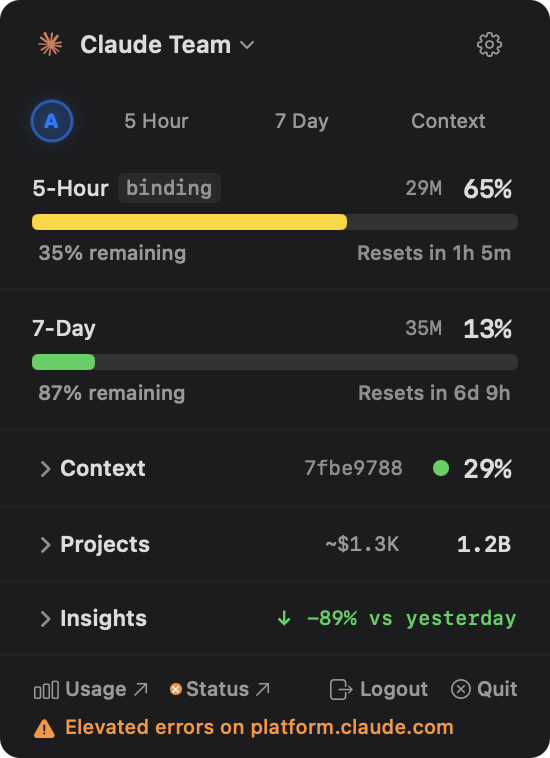
Rate limit countdowns, context window fullness, per-model token breakdowns, and per-project cost for Claude Code and Codex — in a native macOS menu bar popover.
Two Providers
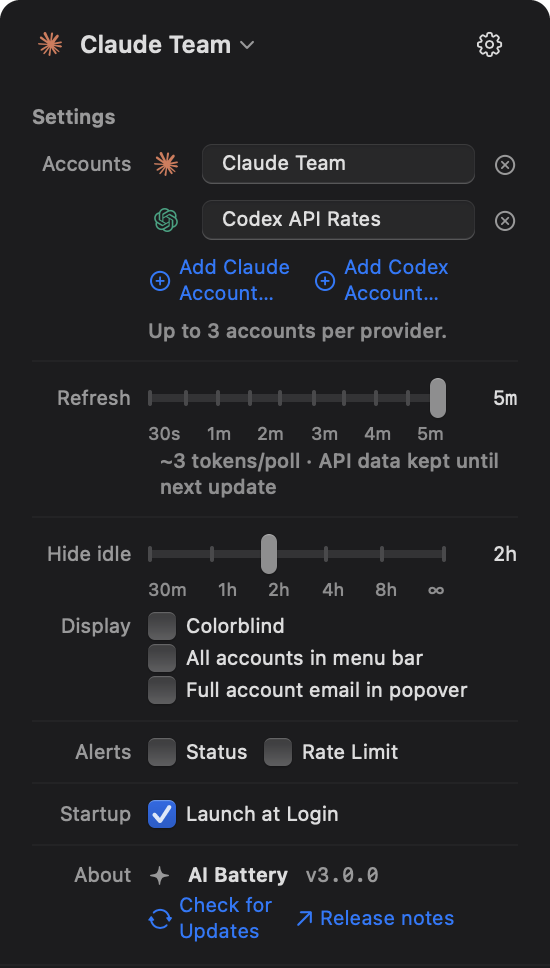
Claude Code and OpenAI Codex in one battery. Sign in to Codex with ChatGPT, import your Codex CLI login, or paste an OpenAI API key. Every label, link, and cost follows the active account's provider.
Rate Limits
Claude's 5-hour and 7-day windows, Codex's 5-hour and weekly windows, Business credit budgets, and API-key per-minute limits — each with utilization, live reset countdowns, and time-to-limit predictions. Green celebration when a limit resets.
Context Health
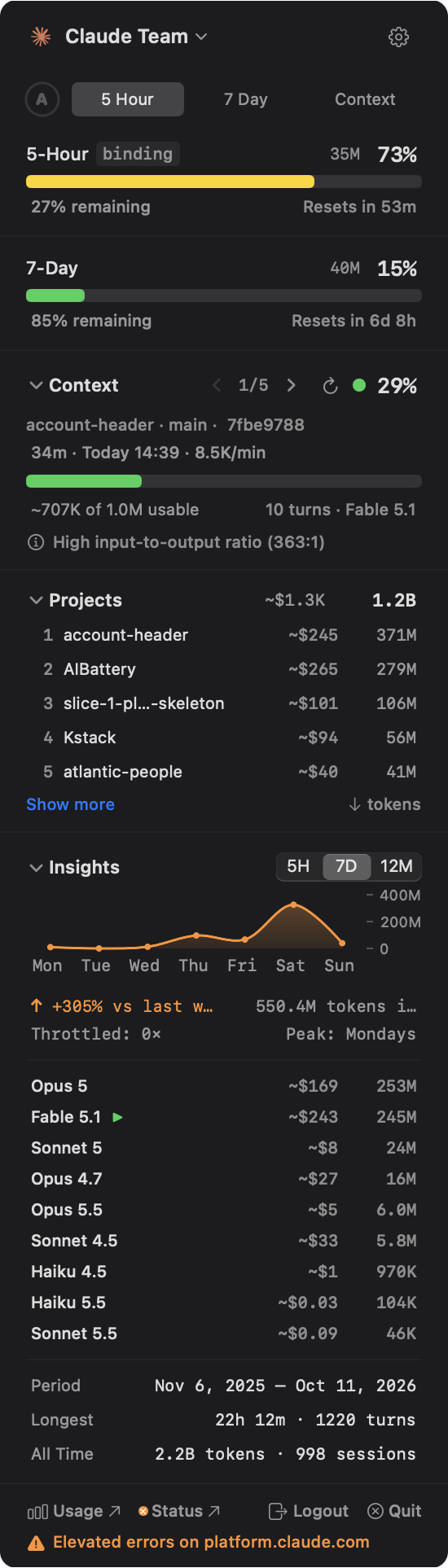
Track your 5 most recent sessions with live context fullness — 1M-token windows for current Claude models, ~258K for GPT-5-family models via Codex. Copyable session IDs, relative timestamps, and smart warnings when a conversation gets too long.
Token Usage
Per-model breakdown: input, output, cache read, and cache write — including subagent usage. Click any value to copy it. A persistent ledger keeps Claude totals from dropping when Claude Code rebuilds its cache; Codex totals are a high-water mark since the first scan.
Insights
Unified activity charts with hover tooltips across 5 hours, 7 days, and 12 months. Time-windowed cost breakdowns, cumulative stats, trend arrows, throttle tracking, and your all-time busiest day.
Per-Project Usage
See which projects use the most tokens and cost, for Claude Code and Codex sessions alike. Sort by tokens, cost, or name; search, expand to your top 10, and copy any row with one click. Marked beta: attribution comes from each session's working directory and doesn't yet cover every case.
Smart Alerts
Get notified on Anthropic or OpenAI outages — both status feeds are watched when you have accounts on both — and when your usage crosses a threshold you set. Star-shaped glow system shows severity at a glance — from subtle glow to starburst rays when throttled.
Multi-Account Overview
Up to 3 Claude and 3 Codex accounts. With two or more, the popover opens on an overview — a card per account with its quota bars, tokens per window and reset countdown, plus a live dot beside whichever account your CLI is using right now. Click a card to drill in; the menu bar leads with the account closest to a limit.
Your context window is a budget. Spend it wisely.
Claude Code and Codex sessions carry their prior messages, file reads, and tool output as context. As that context grows, each turn has more history to process. Anthropic documents auto-compaction once context exceeds 95% capacity, which replaces earlier detail with a summary instead of the full session history.
Why this matters
- Larger context usually means more tokens per turn and more history for Claude to process.
- After auto-compaction, earlier detail is represented by a summary rather than the full original context.
- Starting fresh or compacting earlier keeps sessions more focused and easier to manage.
- Under 60% — AI Battery treats this as comfortable headroom.
- 60–80% — AI Battery uses this as an early warning to compact or start fresh.
- Over 80% — AI Battery treats this as a strong warning, even though Anthropic documents auto-compaction later.

See where your tokens go. Project by project.
AI Battery reads the working directory from each Claude Code or Codex session log and groups token usage by project. You get a ranked breakdown showing which codebases consume the most tokens and their API-equivalent cost — so you can make informed decisions about how you spend your time. Projects is marked beta in the app: working-directory attribution doesn't yet cover every case, so treat the totals as indicative.
Why this matters
- Know which projects are token-heavy before you hit a rate limit. Shift work to lighter repos when you're running low.
- Compare API-equivalent costs across projects to see which ones deliver the most value for your subscription.
- Sort by tokens, cost, or name. Expand to see all projects or filter by name when you have many repos.

Know your patterns. Not just your totals.
AI Battery tracks your Claude Code and Codex usage across three time windows — 5 hours, 7 days, and 12 months — so you can spot trends before they become problems. See when you're most active, how usage compares to yesterday, and whether you're on track to hit a limit.
What you'll see
- Interactive area charts with hover tooltips showing exact values, timestamps, and throttle events for each data point.
- Trend arrows with week-over-week and month-over-month comparisons, plus your busiest day and peak hour.
- API-equivalent cost breakdown per model and time window — see what your subscription saves you compared to pay-per-token rates.

Your token totals should never go backwards.
Claude Code tracks tokens in a local cache file (~/.claude/stats-cache.json) by scanning your session logs. But that cache gets rebuilt periodically — and when old logs are pruned or archived, the rebuild includes fewer files. Your totals drop, even though your actual usage hasn't changed. A user who accumulated 5 million tokens might suddenly see 3 million after a cache rebuild.
How AI Battery calculates tokens
- AI Battery reads two local sources: Claude Code's stats cache for historical aggregates, and your raw JSONL session logs for live data. It never sends token data anywhere.
- Per-model breakdown shows input, output, cache read, and cache write tokens — click any value to copy it. Models are sorted by usage, active first.
- Optional API cost estimates show what your usage would cost at pay-per-token rates, so you can see whether your subscription tier is worth it.
The persistent ledger
AI Battery maintains a high-water-mark ledger at ~/Library/Application Support/AIBattery/token-ledger.json. On every refresh, it compares the current token counts against the stored maximums and keeps whichever is higher. Totals only ever stay the same or increase — they never drop due to a cache rebuild. It's automatic, per-account, and takes up a few KB.
Codex has no stats cache, so its all-time figures are a high-water mark since AI Battery first scanned ~/.codex/sessions: they survive rollout rotation, but nothing earlier can be recovered.
Every account on one screen.
With two or more accounts — Claude and Codex, personal and work — the popover opens on an overview instead of whichever account you looked at last. One card per account: its headline percent, quota bars with the tokens spent in each window, the time to limit and the reset countdown. One account sees no change.
How it works
- Click a card to open that account's full view; the back chevron beside its name, or Escape, returns to the overview. Keys 1–6 pick a card and
rrefreshes every account. The popover remembers where you were between opens. - A small dot breathes beside an account's name while its provider's CLI is actually in use, so the list also says which account you are hitting right now.
- The menu bar leads with the account closest to a limit — the same number its card shows — so the bar and the overview can never disagree. Turn on Display → All accounts in menu bar to list every account's percentage.
- Codex API-key accounts are included, showing the busier of their per-minute request and token limits. A signed-out account becomes a sign-in card rather than disappearing.
- A provider's status dot appears only when Anthropic or OpenAI is reporting a degraded or down component — both status feeds are watched when both providers have accounts.
Frequently asked questions
Is AI Battery free?
Yes. AI Battery is free, open source, and MIT-licensed. Every feature is included — no paywalls, no premium tier. An App Store version is coming for convenience (auto-updates, signed & notarized), and you can support development via GitHub Sponsors.
Does it send my data anywhere?
No. AI Battery reads Claude Code's and the Codex CLI's local session logs for token counts and context health — never your message content. It makes minimal network requests to your provider (Anthropic or OpenAI) for rate limits, to the provider's status page for outage alerts, and to GitHub for update checks. There's no analytics, no telemetry, and no third-party tracking. Read the privacy policy →
Does AI Battery support OpenAI Codex?
Yes, since v3.0. Add a Codex account by signing in with ChatGPT (the browser redirects straight back to the app — nothing to paste), by importing your existing Codex CLI login, or with an OpenAI API key. ChatGPT subscriptions show 5-hour and weekly windows plus any purchased-credit balance; Business and Enterprise spend controls show one Credits budget bar; API keys show OpenAI's per-minute request and token limits with real spend at API rates. See how to add accounts →
What macOS versions are supported?
macOS 13 (Ventura) and later on Apple Silicon. AI Battery is a native Swift app built with SwiftUI; the current release ships as an arm64-only binary, so there is no Intel build yet.
How does it track rate limits?
For Claude accounts, a minimal API call reads your 5-hour and 7-day usage (about 3 tokens per refresh). For Codex accounts, it reads the ChatGPT usage endpoint (no tokens spent), falling back to the newest Codex CLI session log if the endpoint is unreachable. API-key accounts send a 16-token probe to read OpenAI's per-minute limit headers. Token counts and context health always come from local session logs. Read the full guide →
What is context health?
Every Claude Code or Codex session has a large context window that fills up with messages, file reads, and tool results. AI Battery shows how full each session's context is, so you know when to compact or start fresh before the session gets heavy. See how it works →
Which plans are supported?
Claude Pro, Max 5×, and Max 20× subscriptions; for Codex, ChatGPT Free, Plus, Pro, and Team subscriptions plus Business and Enterprise spend-control workspaces; and OpenAI API keys. AI Battery reads the plan from your provider and adapts the layout — windows, a Credits bar, or API limits. Compare Claude plans →
How do Claude Code rate limits work?
Claude Code enforces two rate limit windows: a 5-hour burst limit and a 7-day sustained limit. When you hit either limit, Claude pauses your session until the window resets. AI Battery tracks both in real time — showing utilization percentages, reset countdowns, and time-to-limit predictions so you can pace your work and avoid getting blocked mid-task. Read the full guide →
How do Codex rate limits work?
Codex on a ChatGPT subscription has a 5-hour window and a weekly window; AI Battery shows the percentage used that the usage endpoint reports for your plan, with a reset countdown for each. Business and Enterprise workspaces use a credit budget instead of windows. API keys are limited per minute by requests and by tokens, and every request is billed at OpenAI's API rates. Reaching 100% means you are at capacity; AI Battery only shows a throttle when the provider actually reports one. Read the full guide →
What happens when the context window fills up?
Every session has a large context window. As it fills with messages, file reads, tool calls, and responses, each turn gets heavier. Anthropic documents auto-compaction once context exceeds 95% capacity, which replaces earlier detail with a summary. AI Battery monitors context fullness so you can compact or start fresh earlier. Read the full guide →
Can I see how many tokens a session uses?
Yes. AI Battery shows a per-model breakdown of input tokens, output tokens, cache read tokens, and cache write tokens for Claude and GPT models — click any value to copy it. Claude totals persist across Claude Code cache rebuilds via a local ledger. API-equivalent cost is always on, so you can see what your subscription saves you compared to pay-per-token rates. See all features →
Can I see which projects use the most tokens?
Yes. AI Battery reads the working directory from each Claude Code or Codex session and groups token usage by project. You get a ranked breakdown showing which codebases consume the most tokens and their API-equivalent cost. Sort by tokens, cost, or name, and expand to see all projects. The section is marked beta because working-directory attribution does not yet cover every case, so treat the totals as indicative. See project tracking →
Can I use AI Battery with multiple accounts?
Yes. Up to 3 Claude and 3 Codex accounts. With two or more, the popover opens on an overview: one card per account showing its quota bars, the tokens spent in each window and the reset countdown, with a live dot beside the account your CLI is using right now. Click a card (or press 1–6) to open that account; a back chevron or Escape returns, and the popover remembers where you were between opens. The menu bar leads with the account closest to a limit, so it always agrees with the overview. Each account keeps its own rate limits, token stats, and persistent ledger — ideal for separate personal and work orgs, or Claude and Codex side by side. See the settings guide →
Can I see my Claude and Codex usage at the same time?
Yes. Add a Claude account and a Codex account and the popover opens on the multi-account overview with both on one screen. Each card shows that provider's own shape — 5-hour and 7-day windows for Claude; 5-hour and weekly windows, a Credits budget, or per-minute API limits for Codex — plus the tokens spent and when it resets. A signed-out account stays on the list as a sign-in card, a provider's status dot appears only when that provider is degraded or down, and both status feeds are watched when both providers have accounts. See the overview →
Does AI Battery work with Claude Desktop or the Anthropic API?
No. AI Battery is built for the Claude Code CLI and the Codex CLI: it reads their local session logs and your subscription's usage endpoints. Claude Desktop, claude.ai, and ChatGPT web usage are not tracked. Direct API usage is supported only through OpenAI API keys.
How do I install AI Battery?
The easiest way is via Homebrew: run brew tap KyleNesium/tap && brew install --cask aibattery. You can also use the one-line curl installer or download the DMG directly from GitHub Releases. AI Battery requires macOS 13 (Ventura) or later, plus Claude Code and/or the Codex CLI, on an Apple Silicon Mac (the current release is an arm64-only build).
Download free from GitHub
Open source, MIT-licensed, every feature included. No account required.
brew tap KyleNesium/tap && brew install --cask aibattery
curl -sL https://github.com/KyleNesium/AIBattery/releases/latest/download/AIBattery.zip -o /tmp/AIBattery.zip && ditto -x -k /tmp/AIBattery.zip /Applications && xattr -cr /Applications/AIBattery.app && open /Applications/AIBattery.app
curl -fsSL https://aibattery.dev/install.sh | bash
Using an AI agent? Give it aibattery.dev/install — a runbook it can follow end to end. Requires macOS 13+ and Claude Code and/or the Codex CLI. If it saves you time, consider sponsoring the project or buying the App Store version when it launches.